myMail: Students
Where to Log in to myMail
- Bookmark the myMail page: https://it.eku.edu/mymail OR
- Log in to EKU located on the EKU Homepage in the top right corner
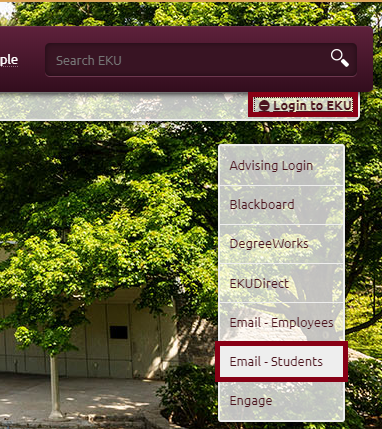
How to Log in to myMail
- Enter your username (example: john_smith@mymail.eku.edu)
- Enter your email password
Find Email Addresses
- Use "Global Address List" to find email address of any EKU classmate, professor or staff member.
- Click People at the top of the screen
- Click All Users on the left side of the screen
- In the Search People box, type the contact’s name and hit Enter
- Click the name of the person you would like to contact and information about that person will appear on the right
- You may click the person’s email address to send him or her an email
2. Use "A to Z" index or people search (located in the top right corner of the EKU homepage) to find any EKU faculty or staff
Configure Computer's Email Program to Connect to myMail
- Log in to your account at least once at mymail.eku.edu
- The server your email program needs to connect to is: pod51004.outlook.com
- Instructions for iOS and other mobile devices
Info for Students that have graduated (If you don't graduate from EKU, information here)
EKU students have access to myMail after graduation. After graduation, password changes require:
- Student ID Number (901+)
- Answer to the original myMail security question
- Telephone contact with the IT Service Desk
Call the IT Service Desk or submit an IT Service Request-an IT representative will call and secure information to complete a password change.
Forgot my Password
Go to myMail
Install Office 365 ProPlus
Code of Ethics for Computing & Communications
Contact Information
IT Service Desk
622-3000
